
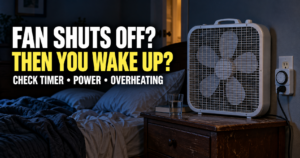
The fan shuts off, and a minute later you are awake. Maybe you notice the silence first. Maybe the air suddenly feels still. Either way, turning the fan back on seems to make the room feel normal again.
A fan shutting off changes three things at once: sound, airflow, and how the room feels. That is why replacing the fan or turning up the thermostat may miss the real problem. I would first figure out which change wakes me.
You can usually narrow it down over a few nights without buying anything.
Start with the easiest clue
Think about what you notice in the first moments after waking:
- “It got too quiet.” The fan may have been covering traffic, a partner’s snoring, or other household sounds.
- “The air stopped moving.” You may be used to feeling a breeze, even when the room temperature has not changed much.
- “I woke up hot.” The room or bedding may become uncomfortable after the fan stops.
- “I heard a click or beep.” The sound of the fan switching off, rather than the silence afterward, might be what wakes you.
- “The fan is off every morning, but I never notice it happen.” Check for a timer, power interruption, or an automatic setting before assuming it caused the wake-up.
That last point matters. Finding the fan off after waking does not prove it woke you. You may have awakened for another reason and only then noticed the quiet room.


Why the silence can wake you
A steady fan gives a bedroom a familiar background sound. When it stops, quieter noises can suddenly stand out: a car outside, footsteps in the hall, the refrigerator cycling, or someone else breathing nearby.
CDC guidance describes a fan or a white noise machine as a way to cover other bedroom sounds. That does not mean fan noise improves everyone’s sleep, but it explains why a room may feel different when a sound you rely on disappears.
I would listen for what becomes noticeable after the fan turns off. If it is traffic or another sound, the fan may be masking an existing noise problem.
If you are unsure whether sound is the reason, try a night with a steady background sound at a comfortable volume while the fan follows its usual schedule. Keep your phone screen dark if you use it to play audio. If you sleep through the fan turning off, that points toward sound, though one night alone is not enough to be certain.
Sleep Ocean has a sleep sounds page if you want something to try. Choose a sound that can play without interruptions or sudden volume changes.

Why losing the breeze feels different from a warmer room
A fan moves air across your skin. You can feel cooler while it runs even if a thermometer across the room shows little change.
When the fan stops, the room may feel stuffy almost immediately. That feeling does not necessarily mean the air temperature jumped at the same moment. I would separate air movement from room temperature before changing the thermostat.
Here is a simple way to test it:
- Before bed, notice whether the fan blows directly on you or mainly circulates air around the room.
- If you wake when it stops, check how the room feels. Is the air actually hot, or do you mainly miss the breeze?
- On another night, try a comfortable fan position that moves air without blowing directly across the bed. See whether the wake-up pattern changes.
If you need airflow all night, look at why the fan is stopping. If you only need the room cooler, check the temperature and bedding instead.
My guide to sleeping with a fan on covers the broader question of whether a fan belongs in your nightly setup. This article is about the specific interruption when it shuts off.
Check whether the bedroom warms up after the fan stops
Some people wake as soon as the fan stops. Others sleep for another hour and then wake sweaty. Those are different patterns.
If you wake right away, the change in sound or airflow deserves attention. If you wake later and feel hot, check the bedroom temperature around the time you wake. The fan may have helped you tolerate a room that was already too warm.
I would look at three things together:
- The room: Does it heat up overnight or after sunrise?
- The bedding: Does a blanket that feels comfortable at bedtime become too warm later?
- The air conditioner: Does it cool the room where the thermostat sits while your bedroom stays warmer?
A fan cannot remove heat from a room the way an air conditioner does. If the bedroom itself keeps getting warmer, restoring fan noise alone may not solve the wake-up.
For that pattern, read Sleep Ocean’s guide to bedroom temperature swings at night.
Find out why the fan shuts off
Before replacing anything, check whether it is doing exactly what it was set to do.
A sleep timer is turned on
Some fans have a timer button that is easy to press without noticing. Others remember a previous setting. Check the display or controls before bed, and look up what each indicator means for your model.
If the fan always turns off after roughly the same amount of time, a timer is one of the first things I would check.
The outlet or power strip loses power
If a lamp, charger, or clock on the same outlet also shuts off, the fan may not be the problem. Look for a switched outlet, a power strip timer, or another obvious cause.
If a plug, outlet, cord, or fan feels unusually hot, smells burnt, sparks, or shows damage, stop using it and have the electrical issue addressed. I would not leave a questionable setup running beside the bed.
The fan overheats or has a mechanical problem
A fan that stops unpredictably, struggles to restart, makes a new grinding sound, or runs only at certain speeds needs a closer look. Unplug it before cleaning or inspecting it and follow the manufacturer’s directions.
I would not assume a fan is safe to run all night just because switching it off and back on makes it work again. A changing noise or repeated shutdown deserves attention.
The setting changes on its own
Some fans have automatic, temperature-based, or “sleep” modes that alter speed. The fan may not be fully off. It may simply become quiet enough that you notice the change.
Try a fixed speed for a night if your model allows it. If the wake-up stops, you have learned more than you would by buying another fan right away.
Is it the fan stopping or the air conditioner cycling?
This is a common mix-up when a person uses the air conditioner as background noise. The cooling system runs, the room sounds steady, then the compressor or indoor blower stops and everything goes quiet.
Check which device actually changed. If the AC cycles normally but the fan continues, your wake-up may follow the AC sound or a change in room temperature. If your separate fan stops, inspect its timer and power source.
Do not force an air conditioner to run continuously just for noise without understanding how your system works. If consistent sound is what helps, a separate sound source may be a simpler test.

If you sleep comfortably while the AC runs but wake as the room warms between cycles, Sleep Ocean’s article about the best AC temperature for sleeping in summer may help you look at the cooling side of the problem.
Try one change each night
I would keep this short enough to be useful while half asleep. For three or four nights, write down:
- When you went to bed.
- Whether the fan was running when you woke.
- What you noticed first: silence, heat, still air, or a sound.
- Whether the fan turned off at about the same time each night.
- What you changed for that night’s test.
Do not change the fan, thermostat, bedding, and background sound together. If you sleep better, you will not know which change helped.
A sensible order is to check the timer first, test sound next if you notice silence, then look at airflow and temperature. The CDC recommends a bedroom that is quiet and comfortably cool, while recognizing that temperature preferences differ from person to person.
Should you just leave the fan on all night?
If the fan is in good working order, its instructions permit that use, and the sound or airflow genuinely helps, that may be the simplest answer. You still want to know why it has been shutting off.
Keep the fan positioned securely with its vents clear. Make sure the cord and outlet are in good condition. Set it so papers or bedding cannot fall against it while you sleep. Follow the manufacturer’s care instructions, especially for cleaning dust from the fan.
I would also ask whether the fan is covering a fixable problem. If it has to blow directly on me to make an overheated room tolerable, I would look at the room temperature. If it has to be loud enough to cover repeated outdoor noise, I would see whether I could reduce that noise too.

If fan sound is what you like, Sleep Ocean’s article on fan noise for sleeping looks more closely at that preference.
What if you still wake when the fan stays on?
That is useful information. The fan may not be the cause, even if its silence was the first thing you noticed after waking.
Check whether the wake-up happens at a similar time on nights when the fan runs continuously. Notice light entering the room, temperature changes, bathroom trips, pain, or other noises. The aim is to follow the pattern rather than keep adjusting a fan that is working properly.
If you regularly struggle to stay asleep or wake feeling unrefreshed, talk with a healthcare professional. Ongoing sleep problems deserve more than another appliance setting. The CDC recommends discussing regular trouble sleeping or signs of a sleep disorder with a healthcare provider.
The first thing I would check tonight
Look at the fan’s timer and mode before bed. That takes less than a minute and may explain the entire pattern.
If it shuts off again, notice what you experience first when you wake. Silence points toward sound. Still air points toward airflow. Heat that develops later points toward the room or bedding. An unexpected shutdown points toward the fan or its power.
Those clues give you a much better next step than buying a louder fan and hoping the problem disappears.
About the author: Nora Whitcomb writes practical sleep guides for Sleep Ocean, helping readers identify what changed in their bedroom before choosing a fix.
As an Amazon Associate we earn from qualifying purchases through some links in our articles.